Work Order Management Software
Create a work order in 30 seconds by voice. Accept requests via WhatsApp. Auto-generate work orders from SCADA faults. Enforce live photo capture. Require 5 Whys before corrective WOs close.


Create a work order in 30 seconds by voice. Accept requests via WhatsApp. Auto-generate work orders from SCADA faults. Enforce live photo capture. Require 5 Whys before corrective WOs close.


WORK ORDER TYPES
Every work order type has the same lifecycle — created, assigned, executed, documented, and closed — but each is triggered differently. Cryotos supports all five, including one no competitor offers.
Unplanned breakdowns reported by operators, technicians, or via work request portal. Includes mandatory 5 Whys root cause analysis.
Scheduled recurring tasks based on time, meter reading, or condition triggers. Auto-generated on schedule.
Structured checklists that verify equipment condition. Auto-creates corrective WOs when inspection items fail.
Highest priority WOs with immediate escalation routing and real-time SMS, email, and WhatsApp alerts.
Machine fault or sensor threshold breach auto-creates the work order. No manual intervention — the equipment itself triggers maintenance.
Cryotos Solves All Five - In One Platform
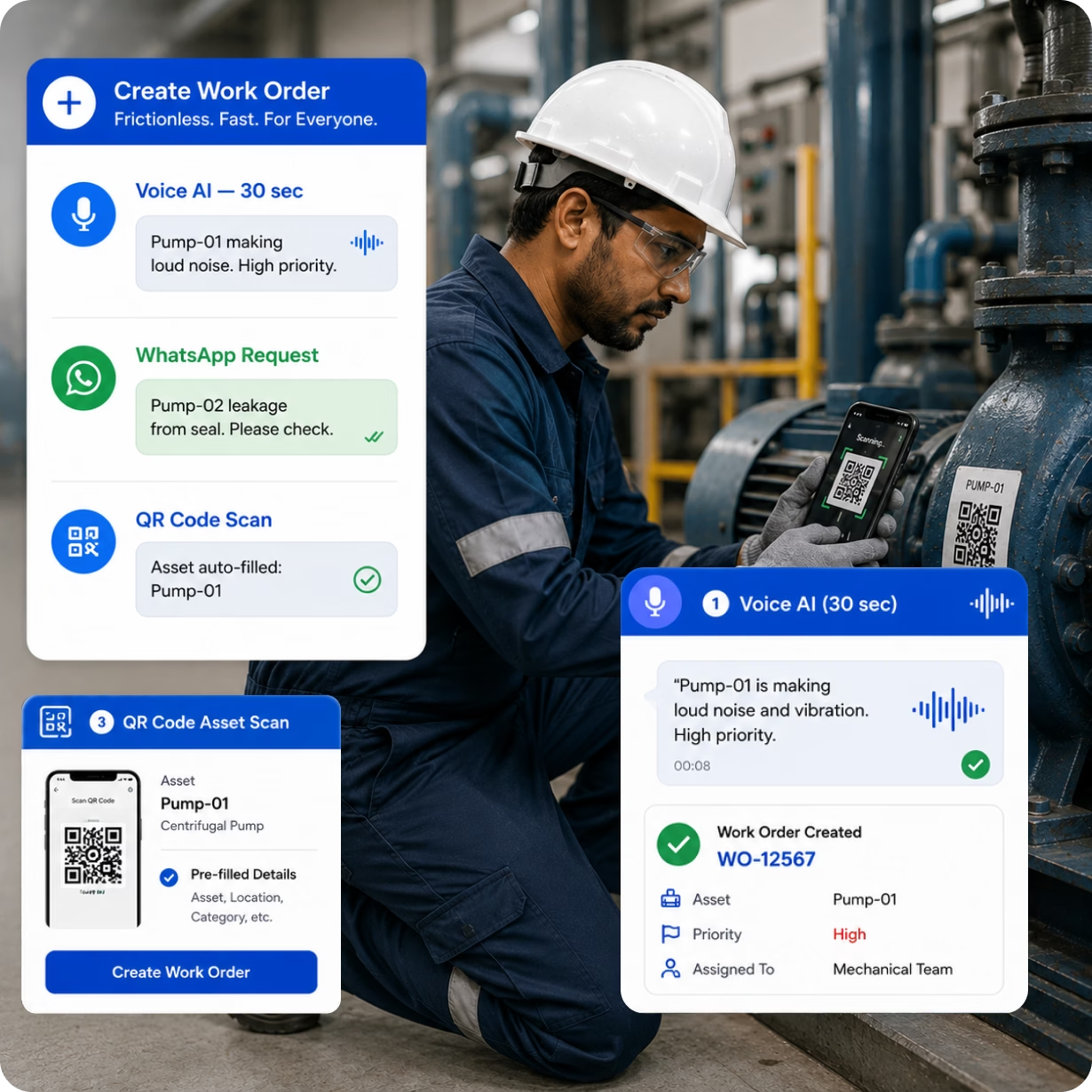
The faster a work order is created, the sooner maintenance begins and the lower the MTTR. Cryotos gives every operator and technician three frictionless ways to create a work order without sitting at a computer.
Voice AI: Speak the asset name, fault description, and priority. The complete work order is created and assigned in 30 seconds. WhatsApp: Operators send a message to the maintenance inbox — the request enters Cryotos immediately. QR Code: Scan the label on the machine to pre-fill the asset details and create the WO in two taps.


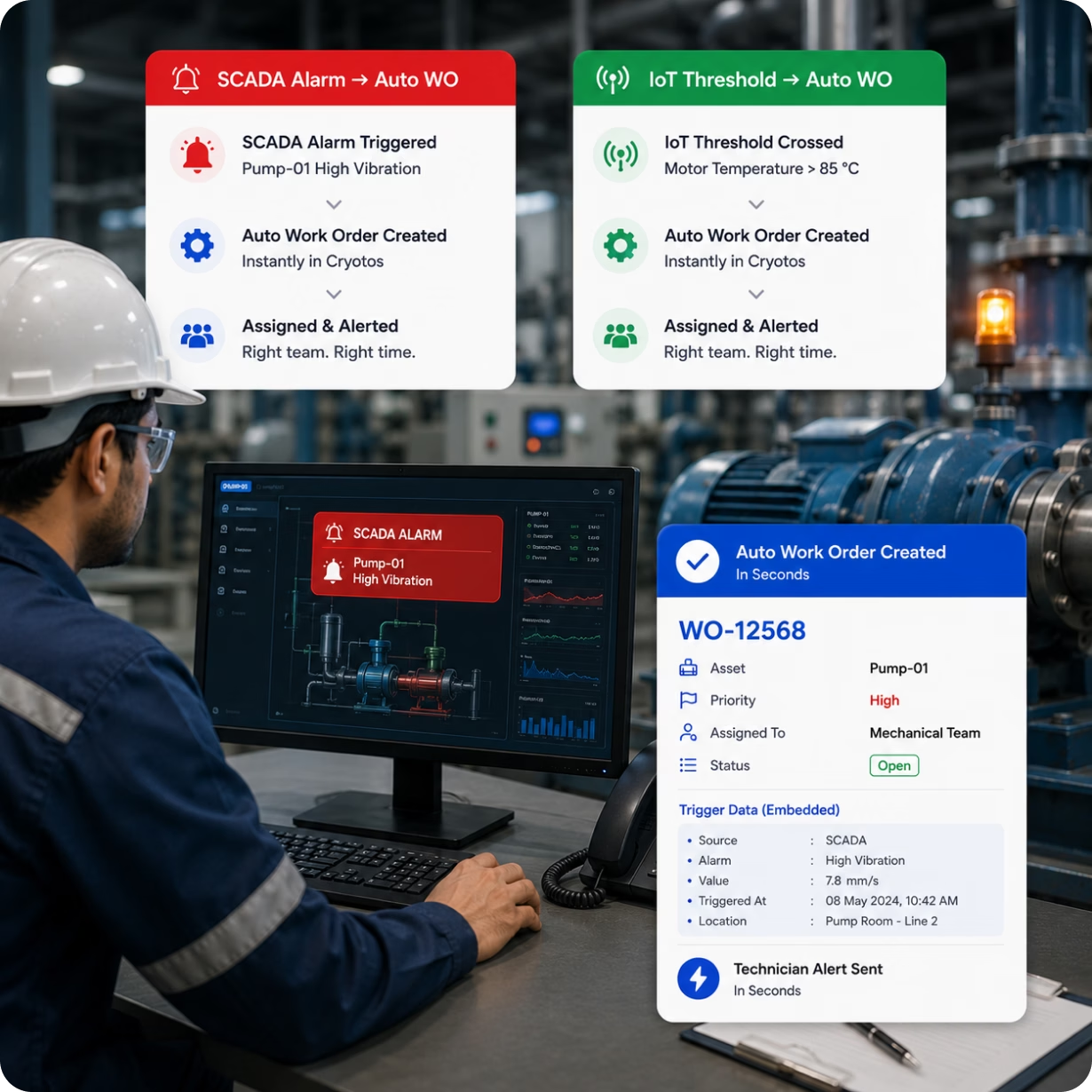
The biggest delay in reactive maintenance isn't the repair — it's the time between fault detection and work order creation. An operator detects an alarm, calls the maintenance desk, the maintenance desk creates the WO, assigns it, notifies the technician. By then, 30–60 minutes have passed.
Cryotos eliminates this delay. SCADA, DCS, and IoT sensor signals connect directly to Cryotos. When a SCADA alarm fires or an IoT reading crosses a threshold, Cryotos auto-creates the work order, assigns it to the correct team, and sends an alert — in seconds. The equipment itself creates the maintenance response.
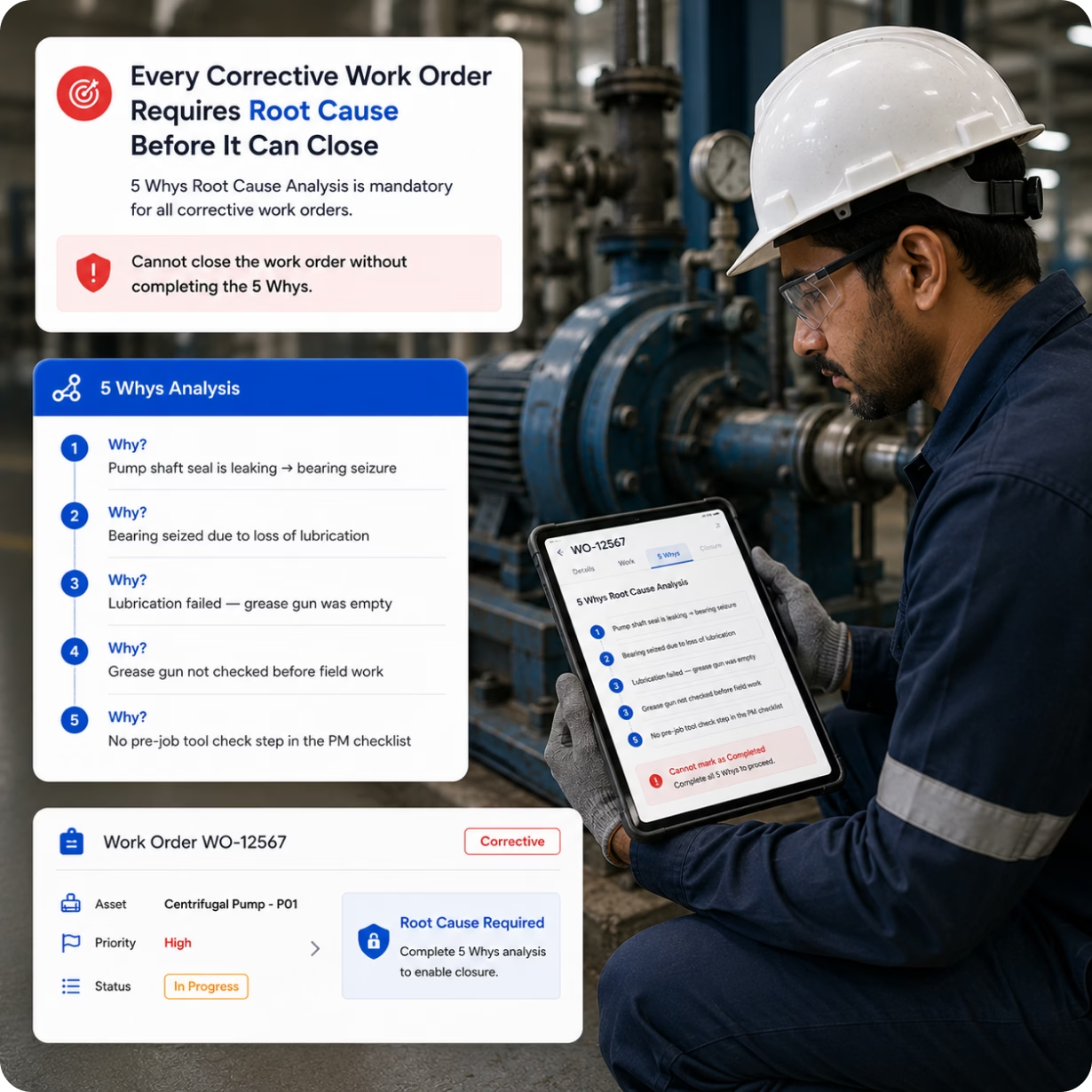
Closing a corrective work order without documenting root cause is why the same equipment fails again next month. Cryotos makes the 5 Whys root cause analysis mandatory before any corrective work order can close. The technician cannot submit the "Completed" status without filling in the 5 Whys chain.


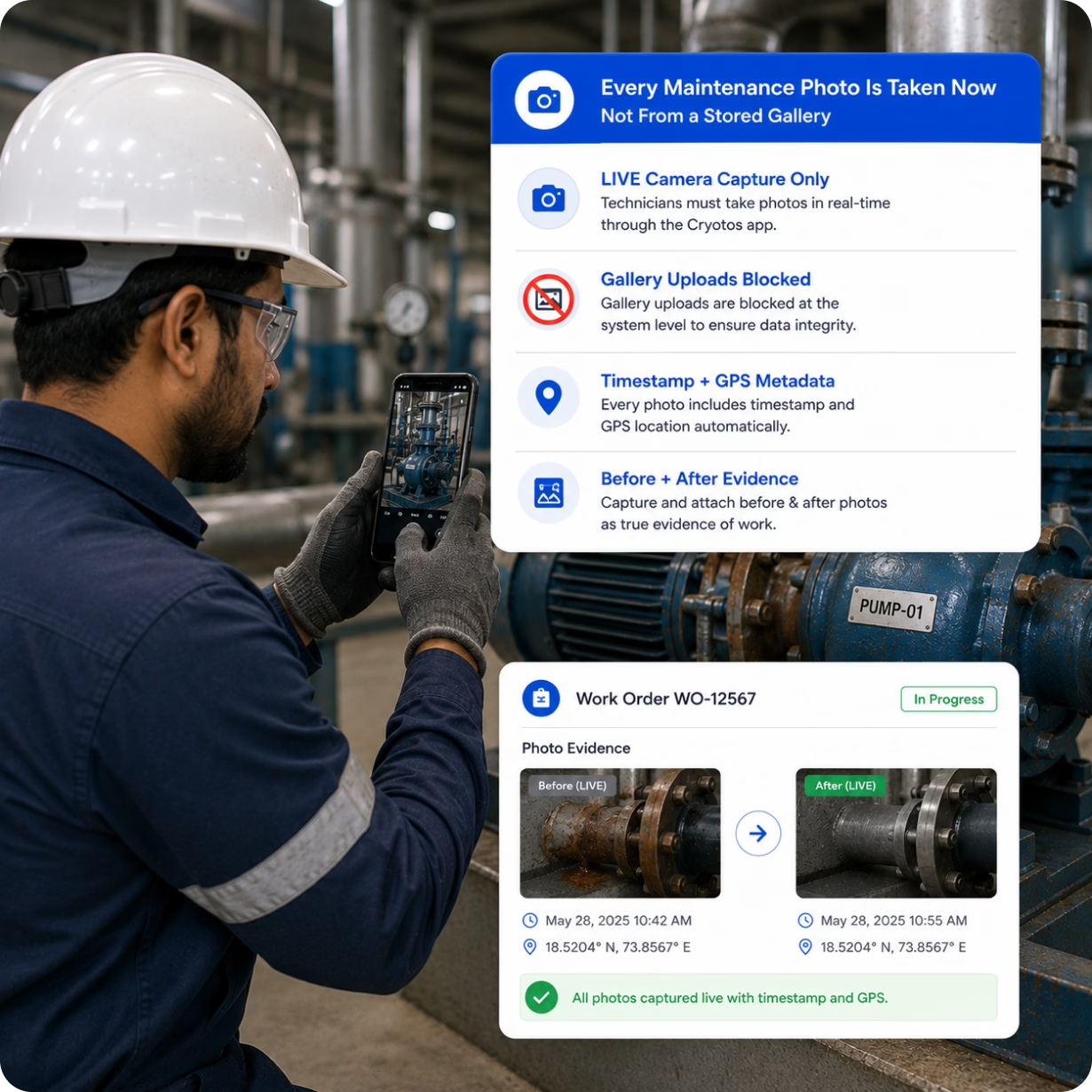
If a maintenance platform allows technicians to attach gallery photos to work orders, a photo taken 2 days ago can be submitted as evidence of today's repair. This creates a false maintenance record — a data integrity failure that defeats the purpose of photographic documentation.
Cryotos enforces LIVE camera capture only. When a work order requires before/after photos, the technician must take them directly through the Cryotos app at the moment of work. The system embeds a timestamp and GPS location in every image. Gallery uploads are blocked at the system level. Every photo in a Cryotos work order was taken at the right place, at the right time, by the right person.
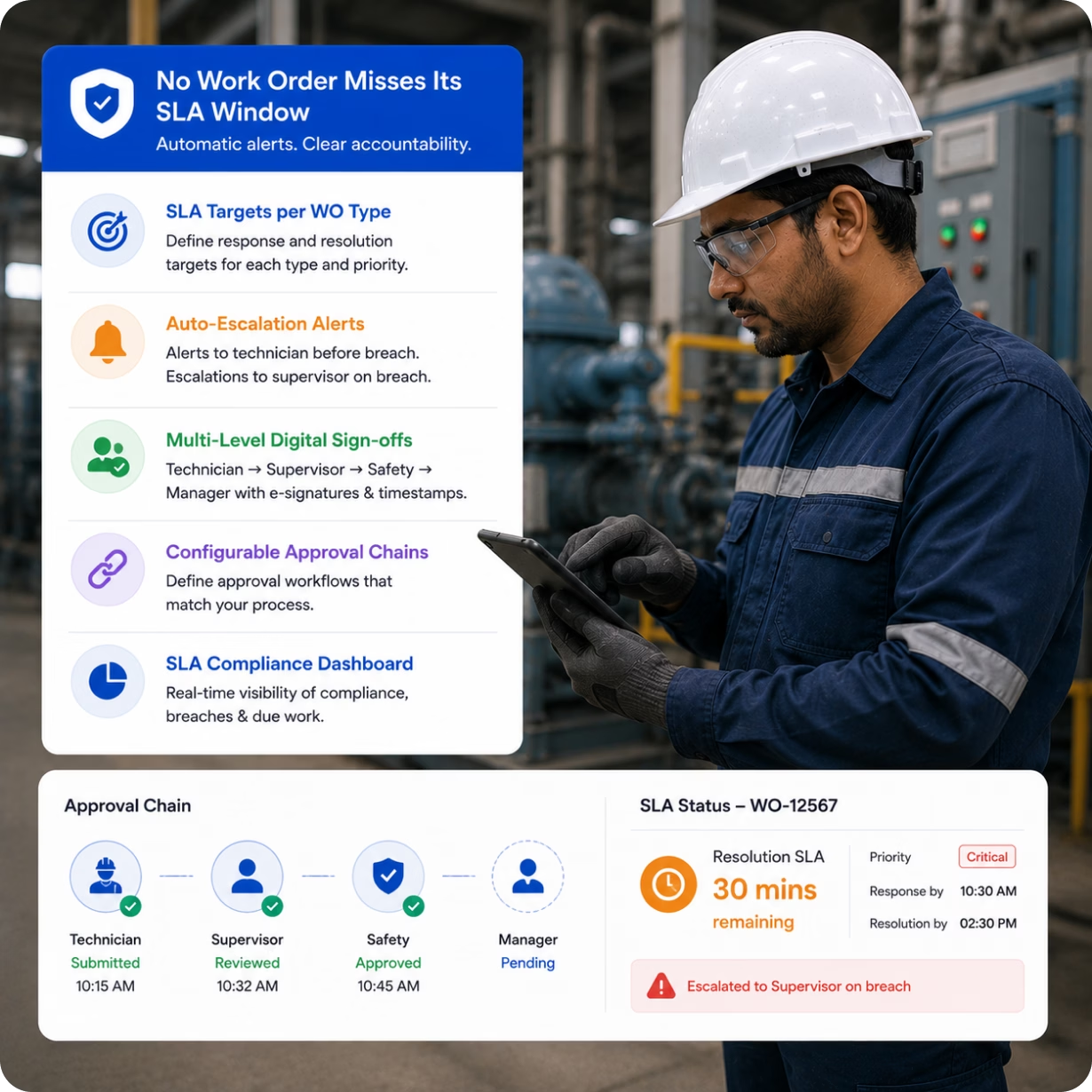
Define response and resolution time targets for each work order type and priority level. When a critical WO approaches its SLA deadline, Cryotos sends an escalation alert to the assigned technician. When SLA is breached, an escalation message goes directly to the maintenance supervisor — automatically, without any manual follow-up required.
Multi-level approval workflows define the chain of sign-offs required before a work order can proceed or close. Technician submits → Supervisor reviews → Safety approves → Manager closes. Each step requires a digital e-signature with timestamp — creating an auditable approval record for compliance and accountability.

WORK ORDER LIFECYCLE
Cryotos manages the full lifecycle, with each stage automated as much as possible to reduce manual intervention and improve speed.
Voice / WhatsApp / QR / Portal / SCADA
Auto-assign or supervisor routes
PTW digital approval before work
Checklist · parts · live photos · notes
Mandatory for corrective WOs
Multi-level digital signatures
Record stored + CAPA tracked
FULL FEATURE SET
Create complete work orders in 30 seconds by speaking — asset name, fault description, and priority. No screen, no keyboard, no delay.

Operators submit work requests via WhatsApp without any app. The request enters Cryotos immediately and routes to the correct maintenance team.

Scan the QR code on any machine to pre-fill asset details and create a work order in two taps — from any mobile device, anywhere on site.

Machine faults and sensor threshold breaches auto-create work orders in seconds — no manual call, no delay between fault detection and maintenance assignment.
Every corrective WO requires 5 Whys root cause analysis before closure. CAPA assigned and tracked. Stops the same failure repeating on the same machine.

Before/after photos enforced via LIVE camera capture only. Gallery uploads blocked at system level. Timestamp and GPS embedded in every image.

Define approval chains: technician → supervisor → safety → manager. Each step requires a digital e-signature with timestamp. No-code configuration.

Set response and resolution SLA targets per WO type. Auto-escalate to supervisor when approaching or breaching deadlines. Real-time SLA compliance dashboard.

High-risk work orders require PTW approval before execution can begin. Digital permits with multi-stage sign-offs integrated directly into the WO workflow.

Log time, parts consumed, and additional expenses against each work order. Track total cost per asset, per team, or per site for budget and CapEx decisions.

Technicians access, update, and complete work orders on mobile without internet. Data syncs automatically when connectivity is restored.

Track completion rates, MTTR, backlog, SLA compliance, and reactive vs. planned ratio. Generate custom reports by asset, team, site, or time period.
WORK ORDER KPIs
Stronger value for your business, from the shop floor to the back office.
Percentage of work orders completed on or before their due date
Mean Time To Repair — average time from WO creation to completion
Percentage of total WOs that are unplanned breakdowns
Percentage of WOs resolved within defined SLA windows
A work order is a formal document to authorize repair, maintenance, inspection, or installation tasks on equipment or facilities. These documents may take various forms, such as digital entries in software applications, system-generated printouts, or traditional paper forms, and are essential for tracking and managing operational tasks efficiently.
Work order management software is a centralized platform that streamlines and simplifies the entire work order lifecycle. It replaces paper-based systems with a digital solution, aiming to optimize maintenance workflows, reduce costs, and improve the longevity and reliability of their assets. This type of software facilitates the creation, assignment, execution, and closure of work orders, ensuring that maintenance tasks are completed promptly and effectively.
Work orders can be generated in two primary ways: manually by staff or automatically by maintenance management systems. Automated generation typically occurs through predetermined triggers in preventive maintenance schedules or monitoring systems that detect equipment issues needing attention.
A comprehensive work order includes the task description, assigned personnel, required tools and parts, estimated time to completion, and any safety instructions. It also details the labor and material costs associated with the task, ensuring all resources are accounted for.
Work orders help organizations maintain control over their maintenance operations, ensuring that tasks are performed safely, efficiently, and promptly. They also provide a historical record of maintenance, which is crucial for compliance, auditing, and planning future maintenance activities.
In the realm of CMMS and work order management software, four main types of work orders cater to different maintenance needs:
1. Preventive Maintenance Work Orders
2. Corrective Maintenance Work Orders
3. Inspection Work Orders
4. Emergency Work Orders
Absolutely. Work orders often include necessary safety checks linked with work permits approved by safety officers. This ensures that all maintenance activities comply with relevant safety regulations and standards, reducing the risk of accidents and non-compliance penalties.
Technology, especially maintenance management software, plays a pivotal role in streamlining the creation, execution, and tracking of work orders. It enhances accuracy, efficiency, and team communication by providing real-time updates and access to work order data from anywhere, at any time.
Proper work order management can significantly boost productivity by minimizing equipment downtime, organizing maintenance tasks effectively, and ensuring that resources are used efficiently. This leads to smoother operations and potentially higher profitability.
Investing in the Cryotos work order management system can significantly benefit your organization, particularly in optimizing your maintenance operations. Here are several key reasons why Cryotos can be a valuable addition to your maintenance management strategy:
Effortless Work Order Management: Avoid paper-based systems and fragmented processes. Cryotos centralizes work order creation, assignment, tracking, and completion, streamlining your entire maintenance workflow.
Empowered Technicians: Equip your team with the power of mobile access. Technicians can access work orders, manuals, and equipment history on the go, reducing downtime between jobs and improving response times.
Optimized Resource Allocation: Utilize Cryotos' intelligent scheduling to assign tasks to the right technicians based on skillset and availability. This ensures maximum resource utilization and minimizes wait times.
Real-Time Visibility: Gain instant insights into the progress of every work order. Identify potential delays, ensure timely completion, and make informed decisions based on real-time data.
Data-Driven Decision Making: Cryotos captures valuable data from work orders, allowing you to identify trends and optimize future maintenance plans. This proactive approach translates to cost savings in the long run.
Improved Inventory Management: Track parts usage through work orders and maintain optimal inventory levels. Cryotos helps minimize delays due to stockouts and prevents unnecessary spending on underutilized parts.
Don't just take our word for it. Try Cryotos today and experience the difference a streamlined work order management system can make for your maintenance operations!
Work order software is a versatile tool that can significantly benefit various industries by streamlining maintenance processes, enhancing efficiency, and improving asset management. Key industries that greatly benefit from implementing work order software are manufacturing, healthcare, automotive, oil and gas, schools and universities, facilities, heavy equipment, and power plants.


I recently purchased Cryotos CMMS Software for asset management needs at my organization and after a few months of testing and monitoring, I'm incredibly pleased with the results. The software is user friendly, accessible and the design is very intuitive. It covers all the aspects of managing maintenance and repair, starting from preventive maintenance and standardizing operation cycles, to scheduling and streamlining workflows. I am highly satisfied with the performance and the range of features offered by Cryotos. Highly recommendable!
Read Review in G2Since we've started using Cryotos, our team has been able to stay on top of all the various SOPs. Checklists and safety procedures are now easily accessible to everyone, and we can quickly reference them whenever we need to. The software has definitely helped to improve our team's communication and efficiency. Plus, the fact that it's cloud-based means we can access it from anywhere, which is a big plus. It has been a great help in keeping everyone on the same page and up to date with the latest procedures.
I am using this application right now for my service team, very good, user friendly, have lot of customisation in workflow and service reports. the team supported for initial implementation, They have good support team. Myself fully recommended this application.
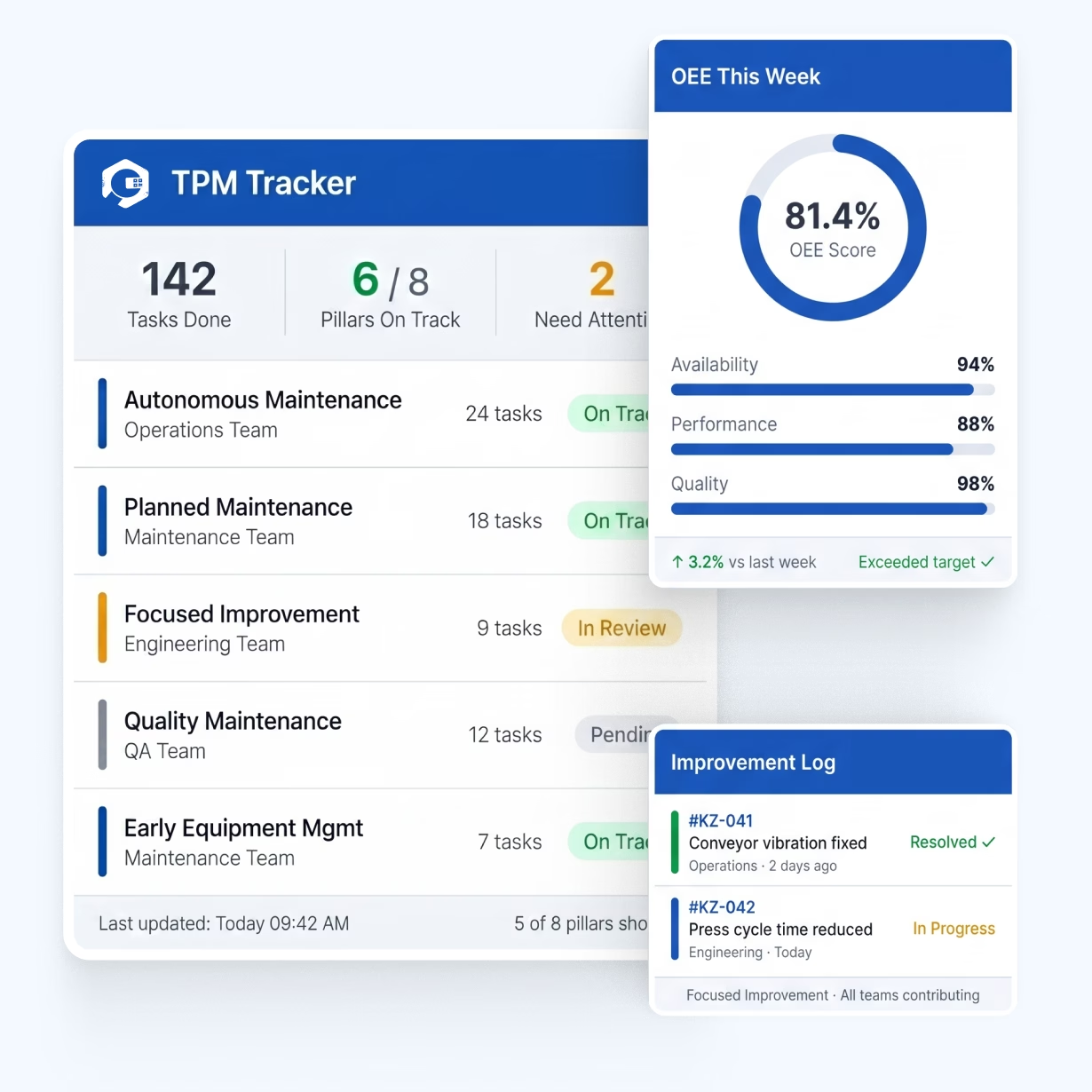
Read Complete Review in G2TPM is a simple idea. Keep machines running well, and let everyone help. It is not just a job for the repair team. The software gives each pillar a home, so the work is tracked and easy to measure.
Most teams run TPM on paper and spreadsheets. Tasks slip. Wins go unrecorded. Cryotos fixes that. It brings every pillar into one system your whole plant can use.